
PANASCOUT3.5.2 - App Store
You'll be able to see results in few seconds.
Publisher Description
Shoot like the pros with the first Photography app from Panavision Inc., the leading designer, manufacturer and supplier of ultra precision equipment for the motion picture industry.
Before cameras roll on movie sets around the world, crews scout the locations.
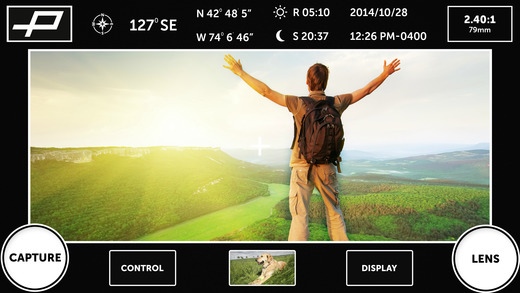
PANASCOUT simulates the cinematographer s viewpoint from a professional cinema camera. Add flavor and composition to your photos when you see what the pros see.
Panascout has an ergonomic workflow that allows filmmakers to access the cinematic quality of any location, and record the true metadata behind it.
CAPTURE your photo and video image metadata in every shot including: GPS Data, Compass Heading, Date/Time, Aspect Ratio, and Focal Length.
Every filmmaker knows what it's like to "chase the sun". With Panascout, you will always be equipped with a Sunrise/Sunset readout for your present location.
Toggle on/off Centering Crosshairs, PANAFRAME Lines, and various Aspect Ratio masking frames in true widescreen 2.40 (Anamorphic), 1.85 (Super 35mm), 1.78 (16x9 HD), 1.33 (4x3) and custom aspect ratios.
PROCESS your photo and video by adding the File Name, Text Notes, Tags, and Audio Notes to the images and in the file metadata. Easily manage and catalogue your work in Folders or save to the native device photo Camera Roll library.
SHARE your photos and videos with friends and colleagues via Email, Dropbox, YouTube, and Tumblr.
The world of PANAVISION is at your fingertips. By clicking the P button, you can find the closest Panavision Near Me anywhere in the world, get the gear the pros wear at the PANASTORE, access PANAVISION s website and social media presence, and get technical information about PANAVISION gear.
General Features:
Totally redesigned and optimized user experience in 3.0
In App purchases allow you to upgrade only the features you need
One touch access to Panavision s global resources
Capture Features:
Record video or photos with metadata on image and in file metadata
Quick add folders before capturing photos/videos
PANAFRAME (2.40, 1.85, 1.78, 1.33, Custom)
Adjust masking levels
Set focal length with zoom controls or prime lenses set
Front or back camera
Toggle flash on/off
Swap capture and lens buttons
Display Date / Time on image
Display GPS coordinates on image
Display Compass direction on image
Display Sunrise/Sunset on image
Display File Name on image
Display Focal Length on image
Display Aspect Ratio on image
Process Features:
Add Voice Notes to photos
Add Text Notes to photos and videos
Add Tags to photos and videos
Manage and Share Features:
Rename, edit, or delete files and folders
Move files to other folders
See your files and folders on a map
Email photos and videos with metadata
Save files to native Camera Roll library
Share to Dropbox, YouTube, and Tumblr
Requires iOS 8.0 or later. Compatible with iPhone, iPad, and iPod touch.
About PANASCOUT
The company that develops PANASCOUT is Panavision. The latest version released by its developer is 3.5.2.
To install PANASCOUT on your iOS device, just click the green Continue To App button above to start the installation process. The app is listed on our website since 2010-03-19 and was downloaded 0 times. We have already checked if the download link is safe, however for your own protection we recommend that you scan the downloaded app with your antivirus. Your antivirus may detect the PANASCOUT as malware if the download link is broken.
How to install PANASCOUT on your iOS device:
- Click on the Continue To App button on our website. This will redirect you to the App Store.
- Once the PANASCOUT is shown in the iTunes listing of your iOS device, you can start its download and installation. Tap on the GET button to the right of the app to start downloading it.
- If you are not logged-in the iOS appstore app, you'll be prompted for your your Apple ID and/or password.
- After PANASCOUT is downloaded, you'll see an INSTALL button to the right. Tap on it to start the actual installation of the iOS app.
- Once installation is finished you can tap on the OPEN button to start it. Its icon will also be added to your device home screen.
Program Details
System requirements
Download information
Pricing
Version History
version 3.5.2
posted on 2010-03-19
Disclaimer
Official App Store Link
We do not host PANASCOUT on our servers. We did not scan it for viruses, adware, spyware or other type of malware. This app is hosted by Apple and passed their terms and conditions to be listed there. We recommend caution when installing it.
The App Store link for PANASCOUT is provided to you by apps112.com without any warranties, representations or guarantees of any kind, so access it at your own risk.
If you have questions regarding this particular app contact the publisher directly. For questions about the functionalities of apps112.com contact us.
